Convenience
Convenient to use wherever you are
Upload your photo and get a ready-to-use visa or passport photo in 2 minutes. Our AI automatically crops the image, adjusts the background and size to match your selected country's requirements. Need an acceptance guarantee? Choose the Manual processing plan.
Processed photos
Acceptance guarantee — included in the Manual processing plan Learn more
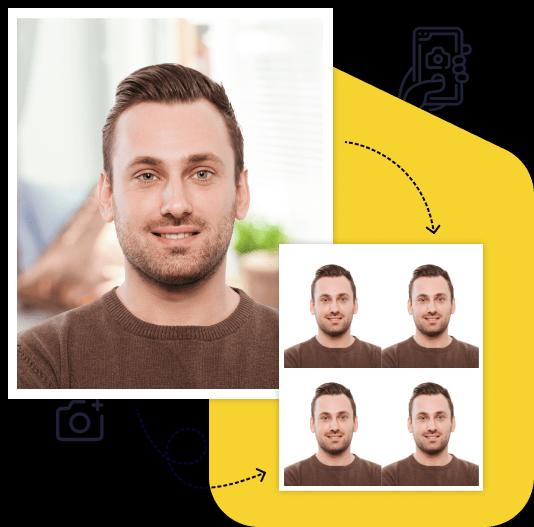
Creating a high-quality biometric photo for your documents will take no more than 2 minutes of your time.

All you need to do is take and upload the photo. We'll take care of the rest.

Artificial intelligence analyzes your photo, crops it to the required size, and removes the background.

We offer a variety of payment methods to ensure that everyone finds a suitable option.

After payment, we will send the file with the finished photos to your email. To use them, simply download and print them out.
Save time and money by creating a biometric photo without leaving your home.

Convenient to use wherever you are

You can work with the photo from any device

Our photos are suitable for any type of documents, including international ones. This ensures convenience and time savings for our clients

You can upload and process multiple photos using our service. Payment is only made for the photo you choose for printing. This ensures convenience and flexibility for our clients

To get perfect shots for any type of document, use the following guidelines.

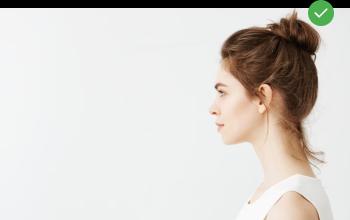
Stand about 50 cm away from the wall. This will help avoid harsh shadows behind your back and keep the details in the photo clear.
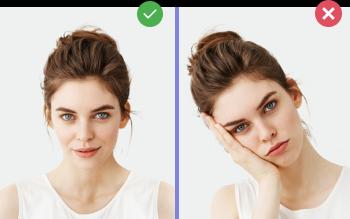
Put your face in front of the camera lens. Hold the camera at eye level. Maintain a neutral facial expression. This will help create optimal conditions for obtaining a high-quality image.

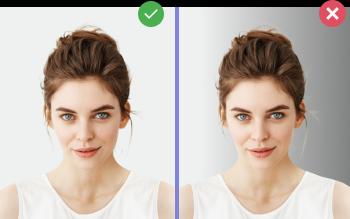
Choose a light or solid color background for the best image quality. Stand facing a light source, such as an open window. The background will be automatically cut out.
Passport photo online
Create document photos online — for passports, visas, driver's licenses and more. Upload your photo, choose the document type, and our AI will adjust it to meet official requirements. Fast and affordable, with an acceptance guarantee on the Manual processing plan.
The 2×2 inch photo (also written as 2x2 in, 51×51 mm, or 600×600 px at 300 dpi) is the official U.S. document photo format used by the State Department, USCIS, and most U.S. immigration forms. Photo-Visa.Online crops, validates, and prepares both digital and printable versions of your 2×2 in photo from a single selfie — validated against the official 2×2 in specification before you pay.
The U.S. State Department defines the 2×2 inch photo as a square color image, 2 inches wide by 2 inches tall, on a plain white or off-white background. The same specification applies to the printed photo for in-person passport applications and the digital file uploaded to DS-160 (visa) or DV Lottery entries — only the file format differs (paper print vs. JPEG).
| Format | Dimensions | Use case |
|---|---|---|
| Inches | 2 × 2 in | Printed passport / USCIS photos |
| Millimeters | 51 × 51 mm | Same as above (metric reference) |
| Centimeters | 5.08 × 5.08 cm | Same as above |
| Pixels @ 300 dpi | 600 × 600 px | DS-160, DV Lottery, all online uploads |
| Pixels @ 600 dpi | 1200 × 1200 px | High-resolution for sharp prints |
| Aspect ratio | 1:1 (square) | Always — non-square uploads are rejected |
| DPI | Width × Height (px) | Typical use |
|---|---|---|
| 72 dpi | 144 × 144 px | Web preview only — too low for submission |
| 96 dpi | 192 × 192 px | Screen preview, not accepted |
| 150 dpi | 300 × 300 px | Below State Dept minimum |
| 200 dpi | 400 × 400 px | Below State Dept minimum |
| 300 dpi | 600 × 600 px | Minimum for State Dept and DV Lottery |
| 400 dpi | 800 × 800 px | Recommended for crisp prints |
| 600 dpi | 1200 × 1200 px | Maximum allowed for DS-160 / DV Lottery uploads |
The U.S. State Department template defines exact ranges for where the head must sit inside the 2×2 in frame. These are the same measurements used at every Acceptance Facility (USPS, Post Office passport agencies). Photos outside these ranges are rejected automatically.
+---------------------+  ← top of frame (2.0 in)
|                     |
|       _____         |
|      / o o         |  ← top of head: 0.31–0.625 in from top
|     |   |   |       |
|     |   ω   |       |  ← eyes: 1.125–1.375 in from bottom
|      _____/        |  ← chin: must be visible inside frame
|        ‖            |
|      shoulders      |  ← upper torso visible
|                     |
+---------------------+  ← bottom of frame (0 in)
        2.0 in wide
Photo-Visa.Online's AI face detector measures these landmarks from the uploaded selfie and crops the 2×2 in frame so head height and eye line both land inside State Department tolerance — no manual cropping required.
For mailed-in passport applications (DS-11, DS-82) and most USCIS forms (I-485, I-130, I-90, N-400), you need a physical print on photo-quality paper, not regular printer paper. Photo-Visa.Online prepares ready-to-print layouts on standard photo paper sizes.
| Paper size | Photos per sheet | Best for |
|---|---|---|
| 4×6 in (10×15 cm) | 4 photos of 2×2 in (with crop marks) | 1-hour photo labs (CVS, Walgreens, Costco, Walmart) |
| 5×7 in | 6 photos of 2×2 in | Higher print volumes |
| A6 (4.1×5.8 in) | 4 photos of 2×2 in | European-format home printers |
| A4 (8.3×11.7 in) | 16 photos of 2×2 in | Bulk print at office or copy shop |
| Letter (8.5×11 in) | 16 photos of 2×2 in | U.S. home printer with photo paper |
Photo-Visa.Online delivers a print-ready 4×6 in PDF / JPEG with 4 perfectly-aligned 2×2 in photos and crop guides — upload it to any of the above services or print at home. For digital-only submissions (DS-160, DV Lottery, online USCIS forms), you only need the 600×600 px JPEG.
| Document | Form | Print or digital |
|---|---|---|
| U.S. Passport (new) | DS-11 | 1 print |
| U.S. Passport (renewal by mail) | DS-82 | 1 print |
| U.S. Passport correction | DS-5504 | 1 print |
| U.S. Visa Application | DS-160 | 600×600 px JPEG upload |
| Diversity Visa Lottery | — | 600×600 px JPEG, max 240 KB |
| Adjustment of Status | I-485 | 2 prints |
| Petition for Alien Relative | I-130 | 2 prints |
| Green Card Renewal | I-90 | 2 prints |
| Employment Authorization | I-765 | 2 prints |
| Re-entry Permit / Travel Doc | I-131 | 2 prints |
| Naturalization (Citizenship) | N-400 | 2 prints |
| Replacement Naturalization Cert | N-565 | 2 prints |
| Application for Asylum | I-589 | 2 prints per family member |
| DACA renewal | I-821D | 2 prints |
The State Department and USCIS publish rejection statistics: roughly 22% of in-person passport applications and 15% of mail-in applications get held for photo issues. The most common rejections all come down to a handful of mistakes:
Photo-Visa.Online checks each of these before payment. If your selfie can't be made compliant (e.g., eyes closed, very low resolution, heavy shadows that AI can't remove), the service refuses the upload — you don't pay until you get a usable photo.
Create Your Photo Now
From $7. Result in 2 minutes. Acceptance guarantee on the Manual processing plan.
Upload PhotoAt 300 dpi (the State Department minimum), a 2×2 inch photo is 600×600 pixels. At 600 dpi it is 1200×1200 pixels. The aspect ratio must always be 1:1 (square).
2 inches equals exactly 50.8 mm, but the standard rounded specification is 51×51 mm. Both refer to the same photo format used for U.S. passport, visa, and immigration documents.
Size 2×2 inches (51×51 mm), color, plain white background, head height 1 to 1⅜ inches (25–35 mm) from chin to top of head, eyes 1⅛ to 1⅜ inches from the bottom, taken within the last 6 months, no glasses, no headwear except religious.
Yes. The 2×2 in / 51×51 mm specification is identical for U.S. passports (DS-11, DS-82), nonimmigrant visas (DS-160), and immigration forms (I-485, N-400). One Photo-Visa.Online order delivers both the printable file (for passports/USCIS) and the 600×600 px digital JPEG (for online forms).
For U.S. passport applications, the photo must be taken within the last 6 months. USCIS forms ask for photos "taken recently"; the I-130 spouse petition requires photos taken within 30 days of filing. If your appearance has changed (new beard, weight loss/gain), use a fresh photo regardless.
A new U.S. passport application (DS-11) requires 1 printed 2×2 in photo. USCIS Green Card forms (I-485, I-130, I-90) require 2 identical prints. Photo-Visa.Online's print layout includes 4 photos per 4×6 in sheet — enough for the application plus spares.
Costco Photo Center is the cheapest at ~$0.17 per 4×6 in sheet (with 4 passport photos). Walmart Photo is $0.13. CVS and Walgreens charge $0.39 with 1-hour pickup. You can also print at home on photo paper using any inkjet photo printer.
The DV Lottery requires the 2×2 in photo as a 600×600 px JPEG, square aspect ratio, file size under 240 KB. Common rejection reasons: file over 240 KB (re-compress), wrong aspect ratio (not square), resolution too low, glasses, head too small. Photo-Visa.Online's DV Lottery option auto-validates against the official DV photo checker.
No. Eyeglasses have been banned in U.S. passport and visa photos since November 1, 2016. The only exception is a documented medical condition with a signed doctor's statement — and even then, glare-free lenses are required.
Yes. Modern phone cameras have plenty of resolution. The key is using the back (rear) camera, even daylight, a plain white wall, and the camera at eye level. Photo-Visa.Online's AI then crops to exactly 2×2 in, replaces the background to pure white, and validates compliance.
Yes. Walgreens charges $16.99 and USPS $15 for two 2×2 prints; CVS prices vary by store. Photo-Visa.Online charges $7 for the digital file or $10 for a print-ready 4×6 in layout, plus the cost of printing one 4×6 photo at any photo lab.