Passport Photo Online — Fast and Accurate
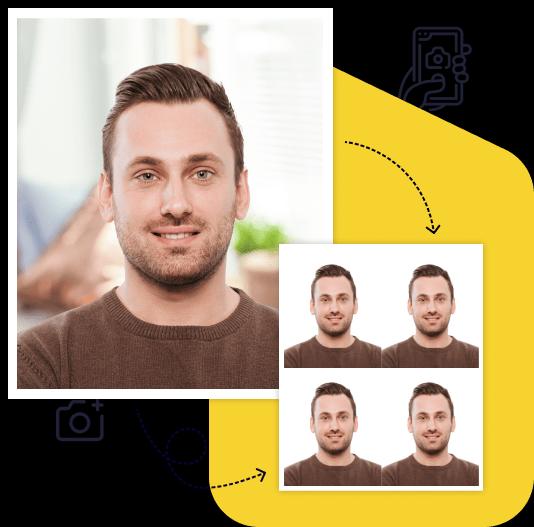
Photo-Visa.Online crops, sizes and background-replaces your passport or document photo with AI-assisted tools. Your face is never modified. Upload a phone selfie — get the result in 2 minutes.
2 minfrom selfie to file
from $13Walgreens $16.99, USPS $15
100+countries and document types
100%money back if the photo is rejected
Make a Document Photo Online in 4 Steps
- Pick a documentUS passport, visa, green card, DV lottery, USCIS — 100+ countries and types.
- Upload your photoFrom phone or laptop — a regular selfie against a wall works.
- AI processes the photoAuto-crop, white background replacement, compliance check — 30–60 seconds.
- Get the resultDigital file and print layout by email for $13.
Making a document photo online is faster than driving to a studio: upload a shot, and in 2 minutes AI will prepare a file matching the document's requirements. No registration — you pay only after a successful compliance check.
Document Photos: Online or Photo Studio?
✓
Document photos online
- 2 minutes — file in inbox
- From $13 per digital file
- From phone at home
- AI adjusts to document specs
- Money back if the photo is rejected
×
Traditional photo studio
- Travel + waiting
- Walgreens $16.99, USPS $15 for 2 prints
- Need to visit studio
- Depends on operator and gear
- A retake means another trip
Online document photos are faster and cheaper: upload a phone shot and AI adjusts the frame to specs. Quality matches studio photos.
Photo-Visa vs Walgreens, CVS, USPS & Walmart
Most Americans take passport photos at the nearest drugstore — Walgreens, CVS or a USPS counter. Online, you take the shot at home, get the file in about 2 minutes and can retake it as many times as you need before paying. Store prices below are for two prints (the standard 2-photo set).
✓
Photo-Visa.Online
- $13 — digital file (JPG, ready for DS-160 / DV Lottery upload) and a printable 4×6 in layout
- Money back if the authority rejects the photo
- 2 minutes from selfie to email
- Unlimited free retakes before payment
- Free preview with a check against State Department specs
- Sized for US Passport Office, USCIS, DS-160 and DV Lottery specifications
×
Walgreens / CVS / USPS / Walmart
- Walgreens — $16.99 for 2 prints, in-store only
- CVS — price varies by store, check before you go
- USPS — $15.00 for 2 prints at the post office counter
- Walmart — price varies by store, check before you go
- Plus travel and waiting time
Store photos are printed — for online forms like DS-160 or DV Lottery you need a digital file instead (DV Lottery: exactly 600×600 px; DS-160: JPEG under 240 KB). Photo-Visa.Online produces both formats from one upload and checks the photo against State Department specs before you pay.
US Passport Photo: 2×2 Inch Requirements
A US passport photo is 2×2 inches (51×51 mm) with a plain white background, taken within the last 6 months. Head height from chin to crown must be 1–1⅜ inches (25–35 mm). The same 2×2 in format applies to US visas (B1/B2, F-1, J-1), Green Card / I-485 applications and most USCIS forms. Photo-Visa.Online automatically crops, replaces background and validates against the U.S. State Department photo requirements before payment.
📐Size2×2 in (51×51 mm) for US passport & visa
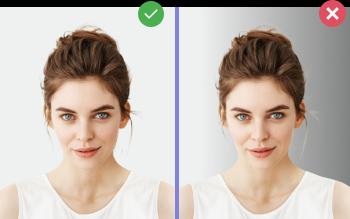
⬜BackgroundPure white, uniform, no shadows
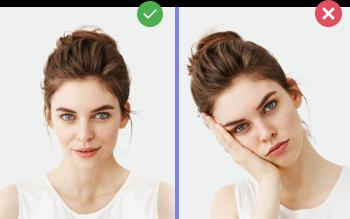
🙂ExpressionNeutral, mouth closed, head straight
💡LightingEven, no shadows on the face
🚫Not allowedDark glasses, headwear (except religious)
How many photos do US documents require?
US Passport (DS-11 / DS-82)1 print, 2×2 in
US Visa (DS-160)1 digital, 600×600 px
Green Card (I-485, I-130)2 prints, 2×2 in
DV Lottery (Diversity Visa)1 digital, 600×600 px
Most US documents share the 2×2 inch (51×51 mm) print format. Online submissions (DS-160, DV Lottery) require a square 600×600 px digital photo. Photo-Visa.Online prepares both formats from one selfie — print-ready 4 photos on a 4×6 in sheet plus the digital file, in 2 minutes.
Visa Photo Online — for Any Country
Create a visa photo online in 2 minutes: upload a shot, AI crops to embassy specs and replaces background. Visa photo online for Schengen (35×45 mm), China visa (33×48 mm), US visa (51×51 mm), South Korea K-ETA and dozens of others. The online visa photo editor checks ICAO compliance before payment.
Online Passport & Document Photo Editor
Photo-Visa.Online is an online passport and document photo editor that works in the browser — no Photoshop or GIMP install.
🎯
AI auto-crop
The passport photo editor auto-crops to official sizes 35×45, 3×4, 2×2, 4×6 and more.
🖼️
Background removal
White background automatically — no studio backdrop needed.
✅
Compliance check
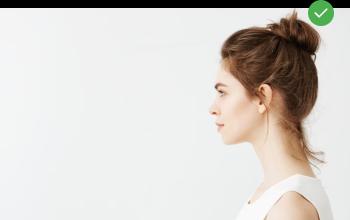
Passport photo editor checks head tilt, expression, lighting against Gosuslugi / MIA requirements.
🌐
No install
Works in the browser on phone or desktop. Document photo editor is an online service, not software.
Document Photo Processing — How the AI Works
Our document photo processing is a full pipeline: the neural net finds the face, calculates proportions and head tilt, replaces the background with white, fits the frame to the required size. All document photo processing runs on the server in 30–60 seconds — no Photoshop, GIMP or desktop apps.
Online document photo processing includes auto-validation: the service rejects photos with off-center face, closed eyes, heavy shadows or non-replaceable background. It runs the same checks as the embassy or MIA — before payment.
Popular Documents
Popular Photo Sizes
US Document Photo Sizes & Forms
US documents use a small number of standard photo sizes. The 2×2 inch (51×51 mm) print is the universal format for passports, visas, Green Cards and naturalization. Online-only forms — DS-160 and DV Lottery — need a square digital file (600×600 px JPEG). Each card below opens the dedicated landing with the form number, dimensions and AI-generated example.
Passport Photo Tools
Passport Photo Guides
Useful Pages