Convenience
Convenient to use wherever you are
Upload your photo and get a ready-to-use visa or passport photo in 2 minutes. Our AI automatically crops the image, adjusts the background and size to match your selected country's requirements. Need an acceptance guarantee? Choose the Manual processing plan.
Processed photos
Acceptance guarantee — included in the Manual processing plan Learn more
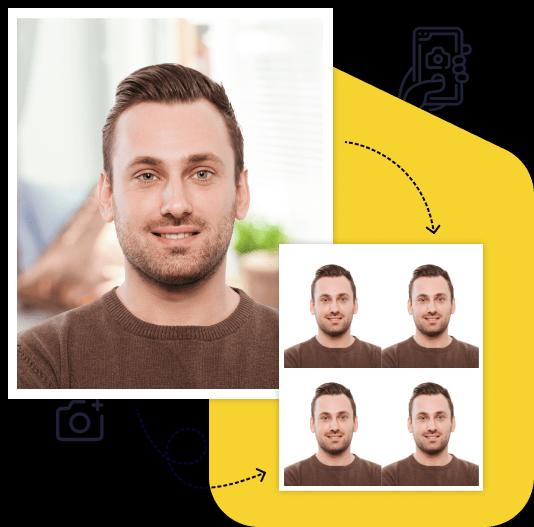
Creating a high-quality biometric photo for your documents will take no more than 2 minutes of your time.

All you need to do is take and upload the photo. We'll take care of the rest.

Artificial intelligence analyzes your photo, crops it to the required size, and removes the background.

We offer a variety of payment methods to ensure that everyone finds a suitable option.

After payment, we will send the file with the finished photos to your email. To use them, simply download and print them out.
Save time and money by creating a biometric photo without leaving your home.

Convenient to use wherever you are

You can work with the photo from any device

Our photos are suitable for any type of documents, including international ones. This ensures convenience and time savings for our clients

You can upload and process multiple photos using our service. Payment is only made for the photo you choose for printing. This ensures convenience and flexibility for our clients

To get perfect shots for any type of document, use the following guidelines.

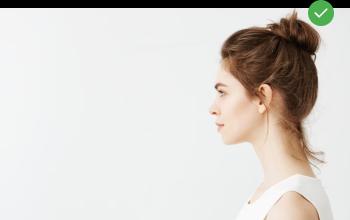
Stand about 50 cm away from the wall. This will help avoid harsh shadows behind your back and keep the details in the photo clear.

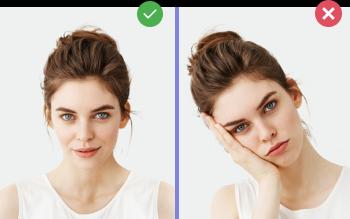
Put your face in front of the camera lens. Hold the camera at eye level. Maintain a neutral facial expression. This will help create optimal conditions for obtaining a high-quality image.

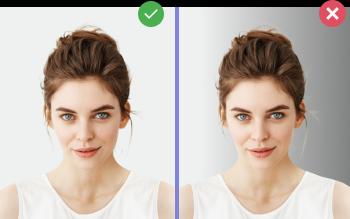
Choose a light or solid color background for the best image quality. Stand facing a light source, such as an open window. The background will be automatically cut out.
Passport photo online
Create document photos online — for passports, visas, driver's licenses and more. Upload your photo, choose the document type, and our AI will adjust it to meet official requirements. Fast and affordable, with an acceptance guarantee on the Manual processing plan.
Most passport photo printing problems come down to two things: the photo was scaled while printing, or it was printed on the wrong paper. A ready-made 4×6 in print layout avoids both. You get one standard photo-print file with several copies of your passport or ID photo at the exact size. Print it at home or order a regular 4×6 print at any photo lab.
The layout with the digital file costs $10. The digital file alone costs $7. You see the result before you pay.
Upload the JPG to any online photo print service and order a standard 4×6 print, not a "passport photo" product. Choose glossy or matte, and turn off auto-correction or cropping if the service offers it. Many pharmacy and big-box photo counters print 4×6 photos the same day, usually for far less than an in-store passport photo session. Prices and options vary by store.
For a US passport, travel.state.gov says the printed photo must be:
The State Department rejects photos changed with software, apps, or filters. For a US passport, our tool crops your original photo to 2×2 in and checks the background and compliance. We don't change your face. Details are on the US passport photo page.
UK printed passport photos must be 45×35 mm, printed to a professional standard on plain white photographic paper with no border. You need 2 identical copies. Canada doesn't accept home-printed passport photos. They must be professionally printed and taken by a commercial photographer. For other documents, check the official instructions. Some ask for a specific number of copies or for the photo to be signed or stamped on the back.
| Photo | Tool |
|---|---|
| US passport and visa, 2×2 in | 2×2 in photo |
| UK, Schengen, and many other countries, 35×45 mm | 35×45 mm photo |
| ID cards and other IDs | ID photo |
For a full overview of sizes, see passport size photo.
Automated plans have no acceptance guarantee. If your shot doesn't work, you get one free re-upload within 30 days. The Manual processing plan ($10) includes a specialist review and an acceptance guarantee. Before you print, you can run the photo through our free passport photo checker at /en/free, and see the common rejection reasons.
Print the 4×6 in layout at home on photo paper, or order a regular 4×6 print from any photo lab, pharmacy photo counter, or online print service. Order a standard photo print, not a passport photo session.
Not for a US passport. The State Department requires matte or glossy photo-quality paper and no visible printer dots. Photocopies and scans aren't accepted.
The printer or print service scaled the image. Print at 100% / Actual size, turn off Fit to page and borderless expansion, and choose 4×6 in paper. Then measure a photo with a ruler before you cut them all.
It depends on the photo size. Bigger photos such as 2×2 in fit fewer copies than 35×45 mm. Our layout shows how many copies fit for your document before you pay.
The State Department doesn't forbid home printing. It sets quality rules: correct size, photo-quality paper, sharp image, and no damage. A careful home print on photo paper can meet them. Canada is different and requires professionally printed photos.
Create Your Photo Now
Free preview. Result in 2 minutes. Acceptance guarantee on the Manual processing plan.
Upload Photo