US Passport Photo Online — 2×2 in, State Dept Compliant

Upload your photo and get a ready-to-use visa or passport photo in 2 minutes. Our AI automatically crops the image, adjusts the background and size to match your selected country's requirements. If your photo is rejected, we'll refund your money.

10 000 +

Processed photos

100 %

Guaranteed acceptance or your money back Learn more

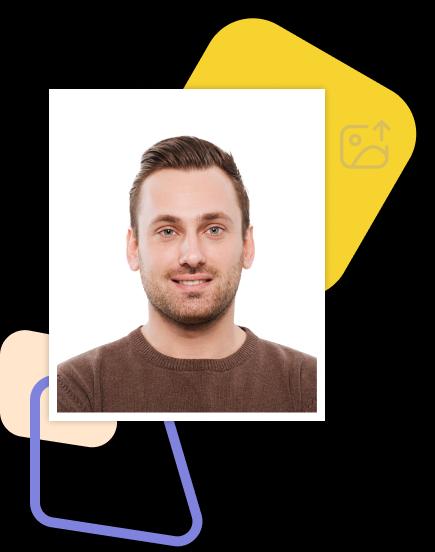
Visa and passport photo example made online

How does it work?

Creating a high-quality biometric photo for your documents will take no more than 2 minutes of your time.

Take a photo and upload it

Take a photo and upload it

All you need to do is take and upload the photo. We'll take care of the rest.

The service is preparing the photo

The service is preparing the photo

Artificial intelligence analyzes your photo, crops it to the required size, and removes the background.

Payment options are available for your convenience

Payment options are available for your convenience

We offer a variety of payment methods to ensure that everyone finds a suitable option.

Here are the finished photos

Here are the finished photos

After payment, we will send the file with the finished photos to your email. To use them, simply download and print them out.

Why choose us?

Save time and money by creating a biometric photo without leaving your home.

Convenience

Convenient to use wherever you are

Flexibility of use

You can work with the photo from any device

Versatility

Our photos are suitable for any type of documents, including international ones. This ensures convenience and time savings for our clients

Processing multiple photos

You can upload and process multiple photos using our service. Payment is only made for the photo you choose for printing. This ensures convenience and flexibility for our clients

Photo processing advantages

How to take a photo?

To get perfect shots for any type of document, use the following guidelines.

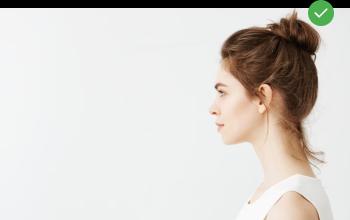
Distance
how to photo

Distance

Stand about 50 cm away from the wall. This will help avoid harsh shadows behind your back and keep the details in the photo clear.

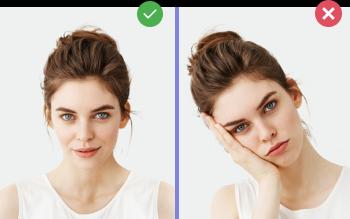
Face position
how to photo

Face position

Put your face in front of the camera lens. Hold the camera at eye level. Maintain a neutral facial expression. This will help create optimal conditions for obtaining a high-quality image.

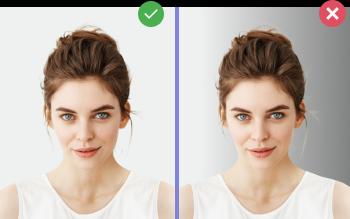
Background and lighting
how to photo

Background and lighting

Choose a light or solid color background for the best image quality. Stand facing a light source, such as an open window. The background will be automatically cut out.

Passport photo online

Create document photos online — for passports, visas, driver's licenses and more. Upload your photo, choose the document type, and our AI will adjust it to meet official requirements. Fast, affordable, and guaranteed to be accepted.

Photo Requirements

US Passport Photo — 2×2 in (51×51 mm)

  • Photo size: 2×2 inches (51×51 mm)
  • Background: plain white or off-white, no patterns
  • Head height (chin to crown): 1–1⅜ in (25–35 mm)
  • Color photo, sharp, high resolution (300+ dpi)
  • Taken within the last 6 months
  • Neutral expression, both eyes open, mouth closed
  • No glasses (since 2016), no headwear (except religious)

Size Specifications

Size (mm)51×51 mm
Size (cm)5.1×5.1 cm
In pixels (300 dpi)602×602 px
In pixels (600 dpi)1205×1205 px
Aspect ratio1:1
BackgroundWhite
FormatJPEG

Documents with 51×51 cm size

US Passport Photo Requirements

The U.S. Department of State requires every passport photo to be exactly 2×2 inches (51×51 mm), in color, on a plain white or off-white background. Photo-Visa.Online auto-validates every photo against the State Department's biometric checklist before payment — same checklist used at the acceptance facility.

Is AI Passport Photo Legal? (2026 update)

In January 2026 the State Department clarified its rules: AI may not alter your face — no filters, beautifying, age-changing or AI-generated portraits. Cropping, sizing and background replacement remain allowed. Photo-Visa.Online never modifies your face, skin, eyes, expression or features. Our AI handles only three things: (1) crops to exact 2×2 in, (2) replaces background with plain white, and (3) validates compliance (head height, eye line, no glasses, sharpness). Your actual face stays exactly as you photographed it.

Size and Format

  • Print size: 2×2 inches (51×51 mm)
  • Resolution: minimum 300 dpi (600×600 pixels)
  • Background: plain white or off-white, no patterns or shadows
  • Head height (chin to top of head): 1 to 1⅜ inches (25–35 mm)
  • Eye height from bottom: 1⅛ to 1⅜ inches
  • Color photo, sharp, no filters or beautifying retouch
  • Taken within the last 6 months

What is Not Allowed

Common rejection reasons by the State Department: glasses (banned since November 2016), uniforms (except religious clothing worn daily), shadows on face or background, low resolution, head tilted, eyes partly closed, mouth open, or photo over 6 months old. Photo-Visa.Online checks each of these automatically and rejects non-compliant uploads before you pay.

How to Take a US Passport Photo at Home

  1. Stand 4–6 feet from a plain white wall in even daylight (no overhead lights).
  2. Use a phone camera at eye level, face the camera directly, neutral expression.
  3. Upload the selfie to Photo-Visa.Online and select US Passport.
  4. AI crops to 2×2 in, replaces background with white, and validates compliance.
  5. Download the digital file or order a print sheet (4 photos on 4×6 in paper) — printable at any photo lab.

Forms That Require This Photo

The 2×2 inch passport photo is required for Form DS-11 (first-time and minor passports), DS-82 (renewal by mail), DS-5504 (corrections) and DS-3053 (statement of consent for minors). The same photo also works for the U.S. visa application (DS-160 print version) and Green Card applications (I-485, I-130, I-90).

Cheaper Than CVS, Walgreens, or USPS

In-store passport photos cost $15–17 at CVS, Walgreens, USPS or FedEx. Photo-Visa.Online delivers a digital + print-ready file from $5 — same biometric standards, same acceptance guarantee. Print at home on photo paper or at any 1-hour photo lab.

Create Your Photo Now

From $5. Result in 2 minutes. Accepted at consulate or money back.

Upload Photo

FAQ

What is the US passport photo size?

The U.S. passport photo size is 2×2 inches (51×51 mm), in color, on a plain white background. Head height from chin to top must be 1 to 1⅜ inches (25–35 mm).

Is an AI-edited passport photo legal in the US? (2026)

In January 2026 the State Department clarified: AI may not alter your face, expression, age or features — but cropping, sizing, and background replacement are allowed. Photo-Visa.Online never modifies your face. Our AI only crops to 2×2 in, swaps the background to white, and checks compliance — your actual face stays exactly as you photographed it. This is the same operation any photo studio performs manually.

Can I take a US passport photo at home?

Yes. The State Department accepts photos taken at home as long as they meet the 2×2 inch size, white background, and lighting requirements. Photo-Visa.Online auto-validates before payment so you pay only for compliant photos.

Are glasses allowed in US passport photos?

No. Eyeglasses have been banned in U.S. passport photos since November 1, 2016, with very limited medical exceptions requiring a doctor's note.

How long are US passport photos valid?

A photo is valid if taken within the last 6 months. If your appearance has changed significantly (new beard, weight change, glasses removed), use a fresh photo.

How much does an online US passport photo cost?

A digital file from Photo-Visa.Online starts at $5. A printable layout (4 photos on a 4×6 in sheet) starts at $6. Compare to $15–17 at CVS, Walgreens, or USPS.

Is the photo guaranteed to be accepted?

Yes. We run the same biometric checks the U.S. acceptance facility uses (head height, eye line, background uniformity, expression). If your passport application is rejected because of the photo, we refund your money.