Convenience
Convenient to use wherever you are
Upload your photo and get a ready-to-use visa or passport photo in 2 minutes. Our AI automatically crops the image, adjusts the background and size to match your selected country's requirements. Need an acceptance guarantee? Choose the Manual processing plan.
Processed photos
Acceptance guarantee — included in the Manual processing plan Learn more
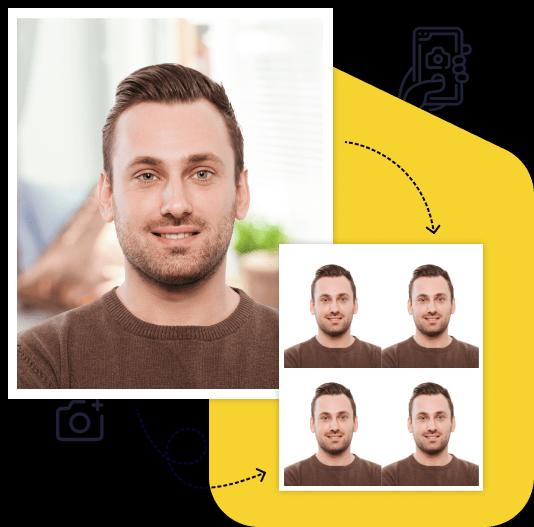
Creating a high-quality biometric photo for your documents will take no more than 2 minutes of your time.

All you need to do is take and upload the photo. We'll take care of the rest.

Artificial intelligence analyzes your photo, crops it to the required size, and removes the background.

We offer a variety of payment methods to ensure that everyone finds a suitable option.

After payment, we will send the file with the finished photos to your email. To use them, simply download and print them out.
Save time and money by creating a biometric photo without leaving your home.

Convenient to use wherever you are

You can work with the photo from any device

Our photos are suitable for any type of documents, including international ones. This ensures convenience and time savings for our clients

You can upload and process multiple photos using our service. Payment is only made for the photo you choose for printing. This ensures convenience and flexibility for our clients

To get perfect shots for any type of document, use the following guidelines.

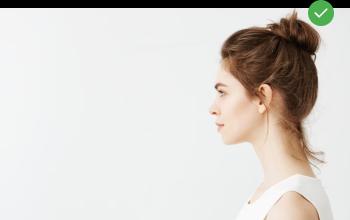
Stand about 50 cm away from the wall. This will help avoid harsh shadows behind your back and keep the details in the photo clear.

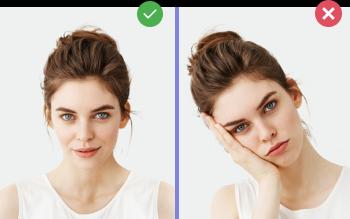
Put your face in front of the camera lens. Hold the camera at eye level. Maintain a neutral facial expression. This will help create optimal conditions for obtaining a high-quality image.

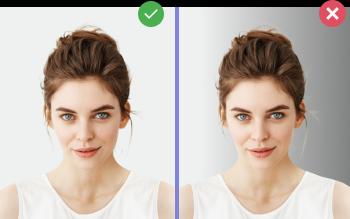
Choose a light or solid color background for the best image quality. Stand facing a light source, such as an open window. The background will be automatically cut out.
Passport photo online
Create document photos online — for passports, visas, driver's licenses and more. Upload your photo, choose the document type, and our AI will adjust it to meet official requirements. Fast and affordable, with an acceptance guarantee on the Manual processing plan.
"Passport size photo" sounds like one standard size, but there isn't one. Each country sets its own dimensions, head size, and background. A photo that's perfect for a US passport is the wrong shape for a UK passport or a Schengen visa. Before you make or edit a passport size photo, check which document it's for.
| Document | Photo size | Head size | Background |
|---|---|---|---|
| US passport | 2×2 in (51×51 mm) | 1 to 1 3/8 in (25–35 mm), chin to top of head | White or off-white |
| UK passport (printed) | 35×45 mm | 29–34 mm, chin to crown | Plain cream or light grey |
| Schengen visa | 35×45 mm | Eyes to chin at least 13 mm (Czech MFA guidance) | Check the consulate's rules |
| Canada passport | 50×70 mm | 31–36 mm, chin to crown | Plain white or light-colored |
| India passport | Varies by issuing office (see below) | Face about 80–85% of the photo (ICAO guidance) | White |
Sizes are as published by the official sources listed for this page. Rules change, so confirm on the official site before you print.
A US passport photo is a 2×2 in square in color, taken in the last 6 months, on a white or off-white background without shadows. Take off your glasses. The State Department also says: "Do not change your photo using computer software, phone apps or filters." For a US photo, our tool crops your original shot to 2×2 in and checks the background and compliance. We don't change your face. See the US passport photo page and the 2×2 in photo tool.
Printed UK passport photos are 45 mm high by 35 mm wide, and you need two identical copies. The background is plain cream or light grey, not bright white. If you apply online, GOV.UK asks for a digital photo at least 600 px wide and 750 px tall, 50 KB to 10 MB, taken in the last month. If you take it on your own device, don't crop it. GOV.UK does the cropping.
Schengen visa photos are 35×45 mm. The Czech Ministry of Foreign Affairs, for example, asks for 35×45 mm with the eyes-to-chin height at least 13 mm. Each consulate or visa center may add its own background and recency rules, so check the instructions for the country you're applying to. Use the 35×45 mm photo tool.
Canadian passport photos are 50 mm wide by 70 mm high. Canada also requires the photo to be taken by a commercial photographer and not altered in any way, which it says includes editing software, filters, and AI tools. A home-made photo won't meet the Canadian passport rules. Use a photo studio.
The Indian rules depend on where you apply. Indian embassy guidance based on ICAO calls for a color photo of 630×810 px on a white background, unaltered by software. That's the same proportion as 35×45 mm. Some Indian missions abroad, such as the embassy in the Netherlands, ask for 2×2 in (51×51 mm). Check the exact size with the passport office or mission handling your application.
If something goes wrong, you get one free re-upload within 30 days. Automated plans have no acceptance guarantee. The Manual processing plan ($10) adds a specialist review and an acceptance guarantee.
Changing the frame of a photo (cropping and resizing it to the required size) is different from changing the picture (retouching skin, swapping the background, adding filters). The US, UK, Canada, and Indian missions all say passport photos must not be altered by software. If a photo needs more than cropping, retake it. If you already have a good photo in the wrong size, see convert a passport photo. For questions about backgrounds, see passport photo background.
Want a quick check before you apply? Our free passport photo checker at /en/free flags common problems. For other ID formats, see ID photos.
It depends on the country. A US passport photo is 2×2 inches. UK and Schengen photos are 35×45 mm, about 1.38×1.77 inches. Canadian passport photos are 50×70 mm.
No. 35×45 mm is a tall rectangle. 2×2 in (51×51 mm) is a larger square. You can't print one size and trim it to the other without changing the head size, so make the photo for the right document from the start.
Yes, for most documents. Take the photo with your phone against a light wall, then upload it to our tool to get the correct size. Canada is an exception: Canadian passport photos must be taken by a commercial photographer.
A digital photo costs $7. A digital photo plus a print-ready 4×6 in layout costs $10. Manual processing with specialist review and an acceptance guarantee costs $10. You see the result before you pay.
For a US passport, taken in the last 6 months. UK digital photos must be from the last month. Other countries set their own limits, so check the official rules.
Create Your Photo Now
Free preview. Result in 2 minutes. Acceptance guarantee on the Manual processing plan.
Upload Photo