Convenience
Convenient to use wherever you are
Upload your photo and get a ready-to-use visa or passport photo in 2 minutes. Our AI automatically crops the image, adjusts the background and size to match your selected country's requirements. Need an acceptance guarantee? Choose the Manual processing plan.
Processed photos
Acceptance guarantee — included in the Manual processing plan Learn more
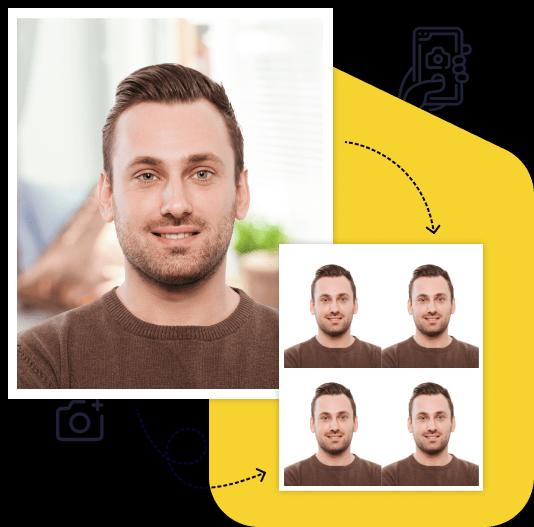
Creating a high-quality biometric photo for your documents will take no more than 2 minutes of your time.

All you need to do is take and upload the photo. We'll take care of the rest.

Artificial intelligence analyzes your photo, crops it to the required size, and removes the background.

We offer a variety of payment methods to ensure that everyone finds a suitable option.

After payment, we will send the file with the finished photos to your email. To use them, simply download and print them out.
Save time and money by creating a biometric photo without leaving your home.

Convenient to use wherever you are

You can work with the photo from any device

Our photos are suitable for any type of documents, including international ones. This ensures convenience and time savings for our clients

You can upload and process multiple photos using our service. Payment is only made for the photo you choose for printing. This ensures convenience and flexibility for our clients

To get perfect shots for any type of document, use the following guidelines.
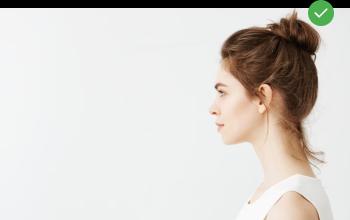
Stand about 50 cm away from the wall. This will help avoid harsh shadows behind your back and keep the details in the photo clear.
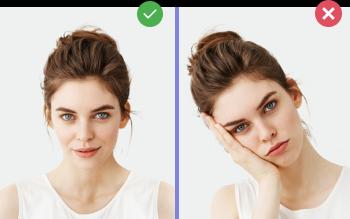
Put your face in front of the camera lens. Hold the camera at eye level. Maintain a neutral facial expression. This will help create optimal conditions for obtaining a high-quality image.

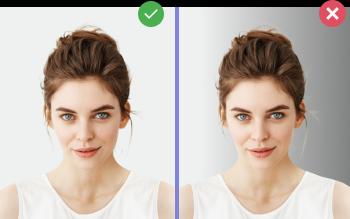
Choose a light or solid color background for the best image quality. Stand facing a light source, such as an open window. The background will be automatically cut out.
Passport photo online
Create document photos online — for passports, visas, driver's licenses and more. Upload your photo, choose the document type, and our AI will adjust it to meet official requirements. Fast and affordable, with an acceptance guarantee on the Manual processing plan.
Before you upload a photo to a passport or visa application, it's worth running it through a passport photo checker. Our free check at /en/free looks at your photo and points out the problems that most often get passport photos rejected. You don't need to pay or sign up.
A photo check is not an official decision. Only the government agency handling your application, such as the US Department of State, decides whether a photo is accepted. A checker reduces the risk of rejection. It can't remove it.
| Check | What it means |
|---|---|
| Face detection and pose | One face, looking straight at the camera, head not tilted or turned |
| Head size and position | Whether the head can be framed to the required size, such as 1 to 1 3/8 in (25–35 mm) chin to top of head on a US 2×2 in photo |
| Background | Plain and light, with no visible objects, patterns, or strong shadows |
| Lighting | Even light on the face, not too dark or washed out |
| Eyes and glasses | Both eyes open and visible, no glasses (glasses aren't allowed in US passport photos) |
| Image quality | Sharp enough, not blurry, grainy, or pixelated |
For US passport photos, edits make things worse. The State Department rejects photos with a digitally replaced background, a retouched outline, or filters. Its own guidance for a non-white background is to fix your lighting and background and take a new photo. The same applies to red-eye: don't edit it, retake the photo. Our list of passport photo rejection reasons covers the most common mistakes. If the problem is the background, see passport photo background.
Once your photo passes, upload it to the passport photo maker:
Automated plans have no acceptance guarantee. If you'd like a person to check your photo, choose Manual processing ($10). A specialist reviews it, and the plan includes an acceptance guarantee. This is the only plan with a guarantee.
Related tools: digital passport photo for online renewal, convert a passport photo to the right size, and print passport photos.
Yes. The check at /en/free costs nothing and doesn't need an account. You pay only if you decide to download a finished photo, and you see that photo before paying.
Not necessarily. Our check is not an official decision. Only the government agency decides. The check catches common technical problems. It can't confirm when the photo was taken or detect every kind of editing. Only the Manual processing plan ($10) comes with an acceptance guarantee.
Yes. The checker and the photo maker work in a phone browser. Upload the original camera file, not a screenshot or a photo forwarded through a messenger app, which lowers quality.
Yes. The online renewal tool checks whether your photo meets basic requirements when you upload it. An employee reviews it later and may ask for a new photo.
For a US passport, the fix is usually a new photo, because the State Department rejects digitally altered photos. The check tells you what to change: light, background, distance, glasses, or pose.
Create Your Photo Now
Free preview. Result in 2 minutes. Acceptance guarantee on the Manual processing plan.
Upload Photo