US Visa Photo Online — DS-160 Compliant

Upload your photo and get a ready-to-use visa or passport photo in 2 minutes. Our AI automatically crops the image, adjusts the background and size to match your selected country's requirements. You see the result for free, and if the authority rejects the photo, we refund you.

Size
2 × 2 in
Background
White
Accepted for
Online submission and print
Price
free preview, file + print sheet $13

Free preview · $13 for the digital file + 4×6 print sheet, paid only after you see it

  • 4.4· 459 ratings
  • 10,000+ photos made
  • Documents for 100+ countries
  • Money back if the authority rejects your photo

How does it work?

Creating a high-quality biometric photo for your documents will take no more than 2 minutes of your time.

  1. Take a photo and upload it

    All you need to do is take and upload the photo. We'll take care of the rest.

  2. The service is preparing the photo

    Artificial intelligence analyzes your photo, crops it to the required size, and removes the background.

  3. Payment options are available for your convenience

    We offer a variety of payment methods to ensure that everyone finds a suitable option.

  4. Here are the finished photos

    After payment, we will send the file with the finished photos to your email. To use them, simply download and print them out.

Why choose us?

Save time and money by creating a biometric photo without leaving your home.

Convenience

Convenient to use wherever you are

Flexibility of use

You can work with the photo from any device

Versatility

Our photos are suitable for any type of documents, including international ones. This ensures convenience and time savings for our clients

Processing multiple photos

You can upload and process multiple photos using our service. Payment is only made for the photo you choose for printing. This ensures convenience and flexibility for our clients

Woman taking a smartphone selfie for a document photo

How to take a photo?

To get perfect shots for any type of document, use the following guidelines.

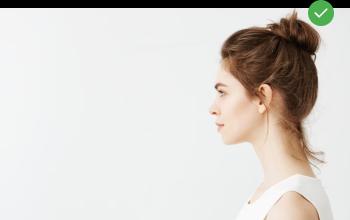
Woman standing in profile half a metre from a light wall

Distance

Stand about 50 cm away from the wall. This will help avoid harsh shadows behind your back and keep the details in the photo clear.

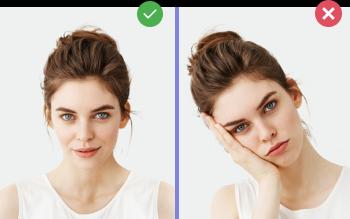
Right and wrong: head held straight and head tilted

Face position

Put your face in front of the camera lens. Hold the camera at eye level. Maintain a neutral facial expression. This will help create optimal conditions for obtaining a high-quality image.

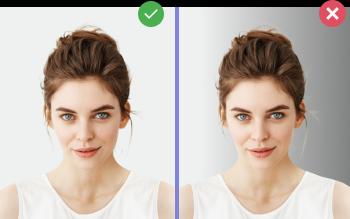
Right and wrong: even light background and background with a side shadow

Background and lighting

Choose a light or solid color background for the best image quality. Stand facing a light source, such as an open window. The background will be automatically cut out.

Passport photo online

Create document photos online — for passports, visas, driver's licenses and more. Upload your photo, choose the document type, and our AI will adjust it to meet official requirements. Fast and affordable, with a free preview.

Choose country

Photo Requirements

US Visa Photo — 2×2 in (51×51 mm) / 600×600 px digital

  • Photo size: 2×2 inches (51×51 mm) for paper, 600×600 px for DS-160 upload
  • Background: plain white, no patterns or shadows
  • Head height (chin to crown): 1–1⅜ in (25–35 mm)
  • Color photo, taken within 6 months
  • Neutral expression, eyes open, mouth closed
  • No glasses, no headwear (except religious)
  • For DS-160 upload: JPEG, square, 600×600 to 1200×1200 px, 24-bit color, no larger than 240 KB

Size Specifications

Size (mm)
51×51 mm
Size (cm)
5.1×5.1 cm
In pixels (300 dpi)
602×602 px
In pixels (600 dpi)
1205×1205 px
Aspect ratio
1:1
Background
White
Format
JPEG

Documents with 51×51 mm size

US Visa Photo Requirements (DS-160)

Every nonimmigrant U.S. visa application — B1/B2 tourist, F-1 student, J-1 exchange, H-1B work, K-1 fiancé and others — uses the DS-160 form, which requires a square photo that meets U.S. Department of State biometric standards. Photo-Visa.Online produces both the digital DS-160 upload (600×600 px JPEG) and a printable 2×2 in version from a single phone photo.

DS-160 Digital Upload Requirements

  • Format: JPEG
  • Aspect ratio: square (1:1)
  • Minimum dimensions: 600×600 pixels
  • Maximum dimensions: 1200×1200 pixels
  • File size: no larger than 240 KB
  • Color, 24-bit color depth
  • Plain white or off-white background
  • Head height: 50–69% of frame (chin to crown)

Printable 2×2 Inch Requirements

  • Print size: 2×2 inches (51×51 mm)
  • Resolution: high, no grain or pixelation
  • White background
  • Head height: 1–1⅜ in (25–35 mm)
  • Color, on photo-quality matte or glossy paper

Why DS-160 Photos Get Rejected

The most common DS-160 photo rejections are: shadows on the face or background, eyeglasses (banned since 2016), wrong head proportion (face too small or too large in frame), low resolution under 600×600 px, non-square aspect ratio, photo older than 6 months. Photo-Visa.Online runs all checks before payment.

How to Make a DS-160 Photo at Home

  1. Stand against a plain white wall, well-lit by daylight (no overhead bulb).
  2. Have someone take the photo at eye level from 4–5 feet away (or use a self-timer) — face the camera directly, neutral expression.
  3. Upload to Photo-Visa.Online, select US Visa Photo.
  4. Receive both 600×600 px JPEG (for DS-160 upload) and a printable 2×2 in file in 2 minutes.

Visa Categories Using This Photo

The same 2×2 in / 600×600 px specification applies to B1/B2 (business/tourist), F-1 / M-1 (student), J-1 (exchange visitor), H-1B / H-2A / H-2B / L-1 (work), O-1 (extraordinary ability), K-1 (fiancé), and R-1 (religious worker). Diversity Visa (DV Lottery) entries use a slightly different specification — see our DV Lottery photo page.

Create Your Photo Now

$13 with a print layout. Result in 2 minutes. Money back if rejected.

Upload Photo

FAQ

What size photo do I need for DS-160?

The DS-160 application requires a square JPEG photo from 600×600 to 1200×1200 pixels, 24-bit color, with a plain white or off-white background. File size no larger than 240 KB.

Can I use the same photo for DS-160 and US passport?

Yes. The 2×2 inch / 600×600 px specification is the same. One Photo-Visa.Online order delivers both the digital file (for DS-160 upload) and a printable 2×2 in version.

Are glasses allowed in US visa photos?

No. Eyeglasses have not been allowed in U.S. visa or passport photos since November 2016, with rare medical exceptions.

What is the cheapest way to get a DS-160 photo?

Online services like Photo-Visa.Online (from $13) cost less than CVS, Walgreens or UPS Store ($15–17), with no trip to the store. The biometric checks are identical.

How long is the DS-160 photo valid?

The photo must have been taken within the past 6 months and reflect your current appearance.