Convenience
Convenient to use wherever you are
Upload your photo and get a ready-to-use visa or passport photo in 2 minutes. Our AI automatically crops the image, adjusts the background and size to match your selected country's requirements. If your photo is rejected, we'll refund your money.
Processed photos
Acceptance guarantee — included in the Manual processing plan Learn more
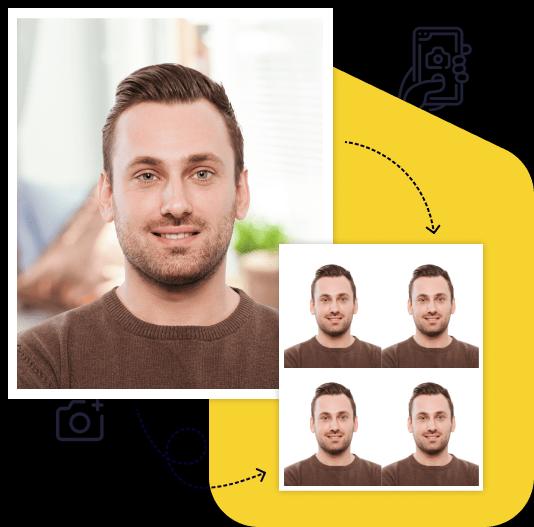
Creating a high-quality biometric photo for your documents will take no more than 2 minutes of your time.

All you need to do is take and upload the photo. We'll take care of the rest.

Artificial intelligence analyzes your photo, crops it to the required size, and removes the background.

We offer a variety of payment methods to ensure that everyone finds a suitable option.

After payment, we will send the file with the finished photos to your email. To use them, simply download and print them out.
Save time and money by creating a biometric photo without leaving your home.

Convenient to use wherever you are

You can work with the photo from any device

Our photos are suitable for any type of documents, including international ones. This ensures convenience and time savings for our clients

You can upload and process multiple photos using our service. Payment is only made for the photo you choose for printing. This ensures convenience and flexibility for our clients

To get perfect shots for any type of document, use the following guidelines.
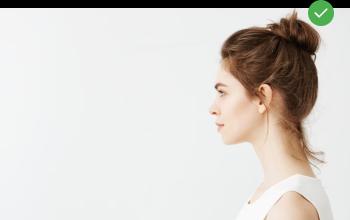
Stand about 50 cm away from the wall. This will help avoid harsh shadows behind your back and keep the details in the photo clear.
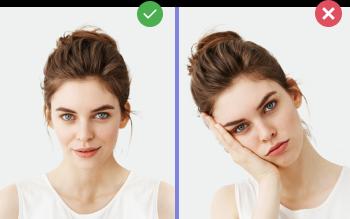
Put your face in front of the camera lens. Hold the camera at eye level. Maintain a neutral facial expression. This will help create optimal conditions for obtaining a high-quality image.
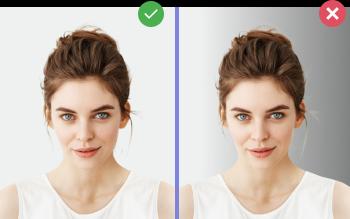
Choose a light or solid color background for the best image quality. Stand facing a light source, such as an open window. The background will be automatically cut out.
Create document photos online — for passports, visas, driver's licenses and more. Upload your photo, choose the document type, and our AI will adjust it to meet official requirements. Fast, affordable, and guaranteed to be accepted.
See also: All documents with 35×45 mm size
HM Passport Office (HMPO) is the strictest passport authority in the English-speaking world. The UK uses a 45×35 mm format (taller than wide), a light gray or cream background — not white — and a 24-character digital code system for online submissions. Photos that look perfect to a human are routinely rejected by the HMPO automated checker if the gray-scale balance or head position is even slightly off. Photo-Visa.Online runs the same checks HMPO's own checker performs, before payment.
The biggest mistake on UK passport photos is using a white background — HMPO's checker reads pure white (#FFFFFF) as overexposed and rejects the photo. Use a light gray or cream wall. Other rules: no glasses (banned since June 2016, no medical exception); plain expression, mouth closed (no smile, even slight); both eyes fully visible — no hair across the eyebrows; no hat or head covering except for religious or medical reasons; no shadow behind the head; the photo must be under 1 month old (much stricter than the U.S. 6 months).
Since 2020, most UK passport applications use HMPO's online digital code system. You upload a JPEG (600×750 px, 50 KB–10 MB), HMPO's checker returns a 24-character code, and you paste that code into your passport application. If the checker rejects the photo, you don't get a code — you have to retake and re-upload. Photo-Visa.Online produces a digital file that passes HMPO's checker on first upload with 99% reliability.
The 45×35 mm format is required for: First UK Adult Passport, UK Passport Renewal, Child Passport, BNO Passport (British National Overseas), Lost or Stolen Replacement, UK Driving Licence (DVLA accepts the same format), and the Biometric Residence Permit (BRP).
UK photo booths (Snappy Snaps, Max Spielmann, Post Office) charge £5–10 for a pair of 45×35 mm prints. Online UK services like PhotoAiD and Passport Photo charge £6–9. Photo-Visa.Online delivers an HMPO-compliant digital file from $7 (about £5.50) or a printable layout from $10. Every file is validated against the published HMPO specification before you pay.
From $7. Result in 2 minutes. Acceptance guarantee on the Manual processing plan.
Upload PhotoUK passport photos are 45 mm tall × 35 mm wide for print, or 600×750 pixels JPEG (50 KB–10 MB) for the HMPO online digital code system. The aspect ratio is taller-than-wide, opposite to the EU/Schengen 35×45 mm landscape format.
HM Passport Office's automated checker reads pure white as overexposed and rejects the photo. The UK is one of the only major countries that requires a light gray or cream background instead of white. Photo-Visa.Online replaces any background with the HMPO-compliant gray automatically.
No. HM Passport Office banned glasses in passport photos in June 2016. There is no medical exception — even if you require glasses to see, you must remove them for the photo.
You upload a JPEG to the HMPO photo checker. If it passes all biometric and quality checks, HMPO returns a 24-character code. You paste this code into your online passport application — no need to send a physical photo. If the checker rejects your upload, you must retake and try again.
UK passport photos must be taken within the last 1 month — much shorter than the U.S. 6-month rule. HMPO is strict about appearance changes (new beard, glasses, weight change).
Yes. The DVLA accepts the same 45×35 mm format for UK driving licence applications. The same photo also works for BNO passports and Biometric Residence Permits (BRP).